Try our free AI tools – no sign-up needed!







52-Week Savings Challenge Tracker – Excel & Google Sheets Money Saving Template
$5.00
A 52 week savings challenge tracker for Excel and Google Sheets. Choose the classic increasing challenge, the reverse version or a fixed weekly amount, then tick off each week as you save.
- All 52 weeks with dates and planned amounts
- Increasing, reverse or fixed challenge styles
- Progress bar, total saved and ahead / behind check
- Works with any step: $1, $5, $10 or more
- Instant download after checkout, also sent by email
- Works in Microsoft Excel & Google Sheets
- Secure checkout · Refund policy
What’s inside
Everything included in this template
- Start Here: quick setup guide
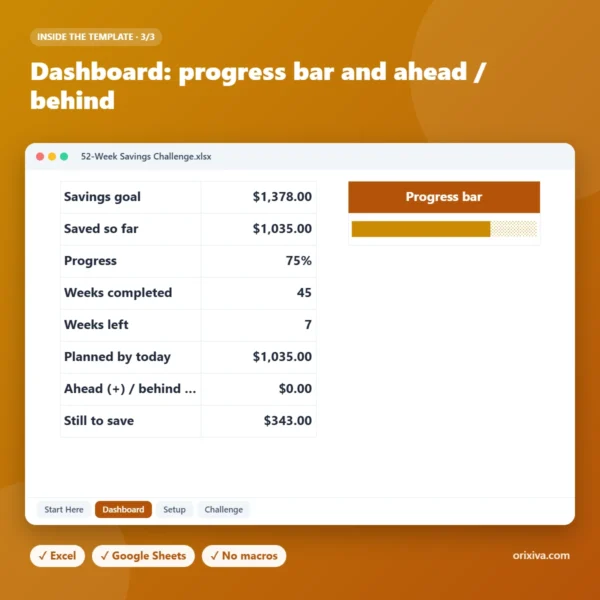
- Dashboard: goal, saved so far, progress bar, weeks completed and ahead / behind
- Setup: start date, challenge style and step amount
- Challenge: 52 weeks with dates, planned amount, actual saved and running totals
Try before you buy
Free sample vs. full version
| Feature | Free sample | Full version |
|---|---|---|
| Content | Limited preview | Complete template |
| Working formulas | Yes | Yes |
| Fully editable | Yes | Yes |
| Watermark | Yes | No |
| Price | Free | $5.00 |
How it works
Try it. Love it. Own it.
- 01
Check the details
See the previews and what is included, or download the free sample.
- 02
Secure checkout
Pay once with a secure checkout. No subscription.
- 03
Download instantly
Open your file in Excel or Google Sheets right away.
52-Week Savings Challenge Tracker
The 52-week savings challenge is a simple way to build savings: you save a growing amount each week for a year. With $1 steps, you save $1 in week 1, $2 in week 2 and $52 in week 52, for a total of $1,378. This tracker for Excel and Google Sheets plans every week, records what you actually save and shows your progress.
What you can do with it
- Choose your challenge style: increasing (classic), reverse (big weeks first) or a fixed amount every week.
- Pick any step: $1 saves $1,378, $5 saves $6,890 and $10 saves $13,780.
- Tick off each week: mark Yes and type the amount you saved.
- Stay on track: the Dashboard compares what you saved with what you planned by today.
- See your progress: a progress bar and % complete motivate you every week.
What’s included
- Start Here: setup steps and colour guide
- Dashboard: totals, progress bar and ahead / behind
- Setup: start date, style and amounts
- Challenge: 52 weeks with running totals
How to use it in 4 steps

- Set your start date.
- Choose the style and step amount.
- Mark each week as you save.
- Check the Dashboard.
Who it is for
Anyone who wants a fun, low-pressure savings habit: students, families saving for holidays, and anyone building a first emergency fund.
File details
- Format: .xlsx workbook with 4 tabs and all 52 weeks
- Works in: Microsoft Excel 2016 or newer, Microsoft 365, Excel for Mac and Google Sheets (File > Import)
- No macros: plain formulas only, so it opens safely on any device
- Free sample: a 3-entry version with the same formulas, so you can test it first
- Delivery: instant download after checkout, also sent by email
Frequently asked questions
How much do you save with the 52-week challenge?
With $1 steps you save $1,378 in a year. With $5 steps you save $6,890. You can type any step amount on the Setup tab.
What is the reverse 52-week challenge?
You start with the largest amount in week 1 and save less each week. Many people find it easier because the hardest weeks come first.
Can I start in the middle of the year?
Yes. Set any start date. The 52 weekly dates are calculated from it.
Does it work in Google Sheets?
Yes. Import the file into Google Sheets. The drop-downs, totals and progress bar keep working.
What if I miss a week?
The Status column shows “Missed” for past weeks without a deposit. You can catch up later and the Dashboard shows if you are back on track.
Share how you use it
Bought this savings challenge tracker? Leave a review below with one tip from your own setup, such as a category you added or how often you update it. Real tips from buyers help the next person decide, and we read every review when planning updates.
Licence
For personal use or use in one business. Please do not resell, share or redistribute the file.
Questions about this template
Does it work in Google Sheets?
Yes. Open it in Microsoft Excel, or upload it to Google Sheets.
Is it a subscription?
No. You pay once and keep the file.
How do I get my file?
A download link appears right after checkout and is also sent to your email.
Can I edit it?
Yes. Change labels, categories and colors to fit your needs.
What if I need help?
Contact us through the contact page. Please also read our refund policy.
Related products
-
Net Worth Tracker – Excel & Google Sheets Monthly Assets and Debts Template
$7.00 -

Subscription Tracker – Excel & Google Sheets Monthly Subscriptions and Renewals List
$5.00 -

Travel Budget Planner – Excel & Google Sheets Trip Budget and Expense Tracker
$7.00 -

Paycheck Budget Planner – Excel & Google Sheets Biweekly Budget Template
$9.00
Reviews
There are no reviews yet.