This wedding budget planner is an Excel and Google Sheets template that keeps every wedding cost in one place. Set your total budget and guest count, list your vendors and costs, then record each deposit and payment. The planner shows what you have paid, what is still due and whether you are over or under budget.
What you can do with it
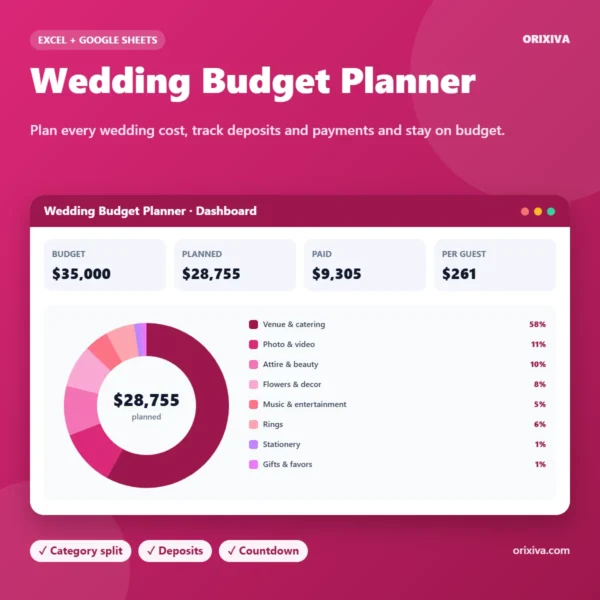
Start with a smart split: typical percentages for venue, catering, photography, attire, flowers, music and more.
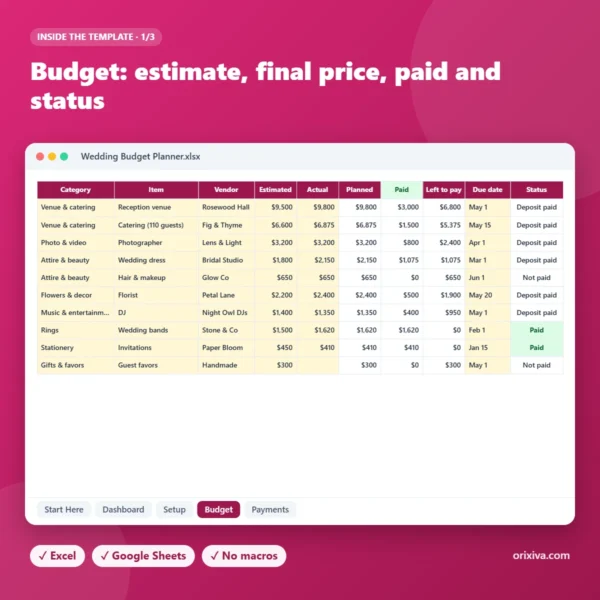
Compare estimates and final prices: the planned cost uses the final price once you have it.
Never miss a payment: each item shows Paid, Deposit paid or Not paid, plus a due date.
Know your cost per guest: useful when you are deciding on the guest list.
Count down: the Dashboard shows the days left to the wedding.
How it works
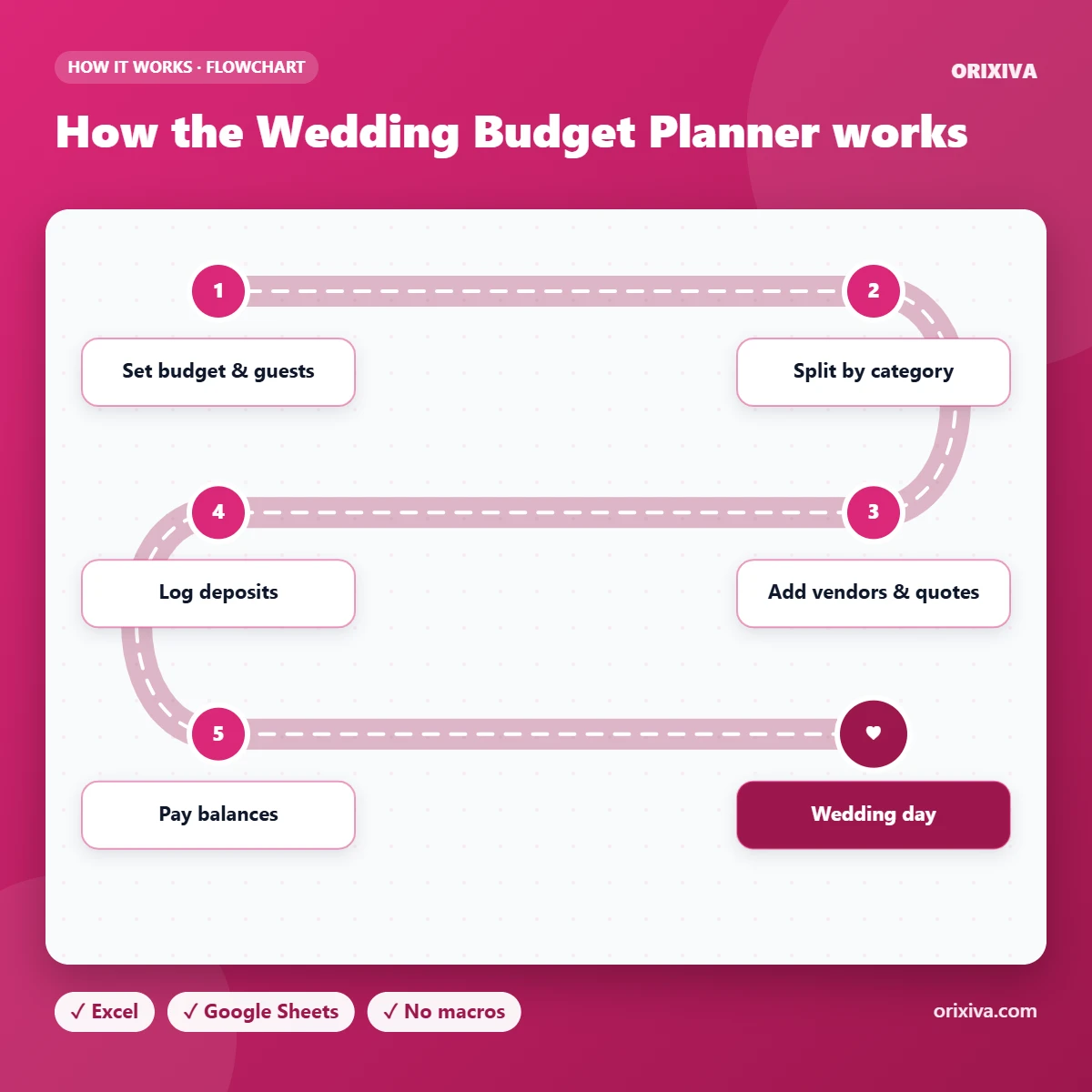
How the Wedding Budget Planner works, step by step.
Set your budget, date and guest count.
Add each cost with vendor, estimate and due date.
Log deposits and payments as you make them.
Check the Dashboard before every big decision.
What’s included
Start Here: setup steps and colour guide
Dashboard: totals, countdown and category summary
Setup: budget, date, guests and category split
Budget: up to 80 items
Payments: up to 200 payments
Who it is for
Couples planning their wedding, wedding planners managing a client budget, and families sharing the costs. Share the file in Google Sheets so both partners can update it.
File details
Format: .xlsx workbook with 5 tabs, room for 80 items and 200 payments
Works in: Microsoft Excel 2016 or newer, Microsoft 365, Excel for Mac and Google Sheets (File > Import)
No macros: plain formulas only, so it opens safely on any device
Free sample: a 3-entry version with the same formulas, so you can test it first
Delivery: instant download after checkout, also sent by email
Frequently asked questions
How should I split my wedding budget?
A common guide is about 45% for venue and catering, 12% for photo and video, 8% each for attire and flowers, and the rest for music, rings, stationery, transport and favors. You can change every percentage.
Can two people use it at the same time?
Yes. Upload it to Google Sheets and share it. Both partners can update payments and costs.
What is the difference between Estimated and Actual?
Estimated is the quote or your guess. Actual is the final agreed price. The planner uses Actual when it is filled in, otherwise the estimate.
Does it track deposits?
Yes. Log each deposit on the Payments tab. The item shows Deposit paid until the full amount is paid.
Does it work in Google Sheets?
Yes. Import the file into Google Sheets. The drop-downs and totals keep working.
Share how you use it
Bought this wedding budget planner? Leave a review below with one tip from your own setup, such as a column you added or how often you update it. Real tips from buyers help the next person decide, and we read every review when planning updates.
Licence
For personal use or use in one business. Please do not resell, share or redistribute the file.
Reviews
There are no reviews yet.
Be the first to review “Wedding Budget Planner – Excel & Google Sheets Wedding Cost and Payment Tracker”Cancel Reply
Questions about this template
Does it work in Google Sheets?+
Yes. Open it in Microsoft Excel, or upload it to Google Sheets.
Is it a subscription?+
No. You pay once and keep the file.
How do I get my file?+
A download link appears right after checkout and is also sent to your email.
Can I edit it?+
Yes. Change labels, categories and colors to fit your needs.










Reviews
There are no reviews yet.