Try our free AI tools – no sign-up needed!

Free Student & Teacher Toolkit: 22 Study and Teaching Tools
Plan, revise, quiz, teach and track grades. 22 tools that share your data and run 100% in your browser.
22 tools · Auto-marked quizzes · Flashcards · No sign-up
ORIXIVAStudent & Teacher Toolkit · 22 free tools
Everything runs inside your browser. Nothing you type is uploaded or shared. Your work is saved only on this device. Export a backup regularly to protect your work.
Free Study Planner, Quiz Maker and Teacher Tools in One Place
The Orixiva Student & Teacher Toolkit puts 22 free learning tools on one page: a smart study planner, exam countdown, Pomodoro timer, interactive quizzes with automatic marking, spaced-repetition flashcards, a question bank, worksheet and exam paper builders, a lesson plan builder, rubrics, a GPA calculator, an attendance calculator, a citation generator and more. The tools share your data, so questions from your question bank can become a quiz or an exam paper in one click, and your quiz scores and focus time appear in your progress dashboard. Everything runs in your browser. There is no sign-up and nothing you type is uploaded.
Quick answer: Students should open Exam Countdown to add exam dates, then Smart Study Assistant to build a day-by-day plan, and revise with Spaced-Repetition Flashcards and the Interactive Quiz. Teachers should save questions in the Question Bank, then send them to the Exam Builder or turn them into a practice quiz, and print worksheets with answer keys.
- 22free tools
- 6sections
- 5citation styles
- 0sign-ups or uploads
All 22 tools at a glance
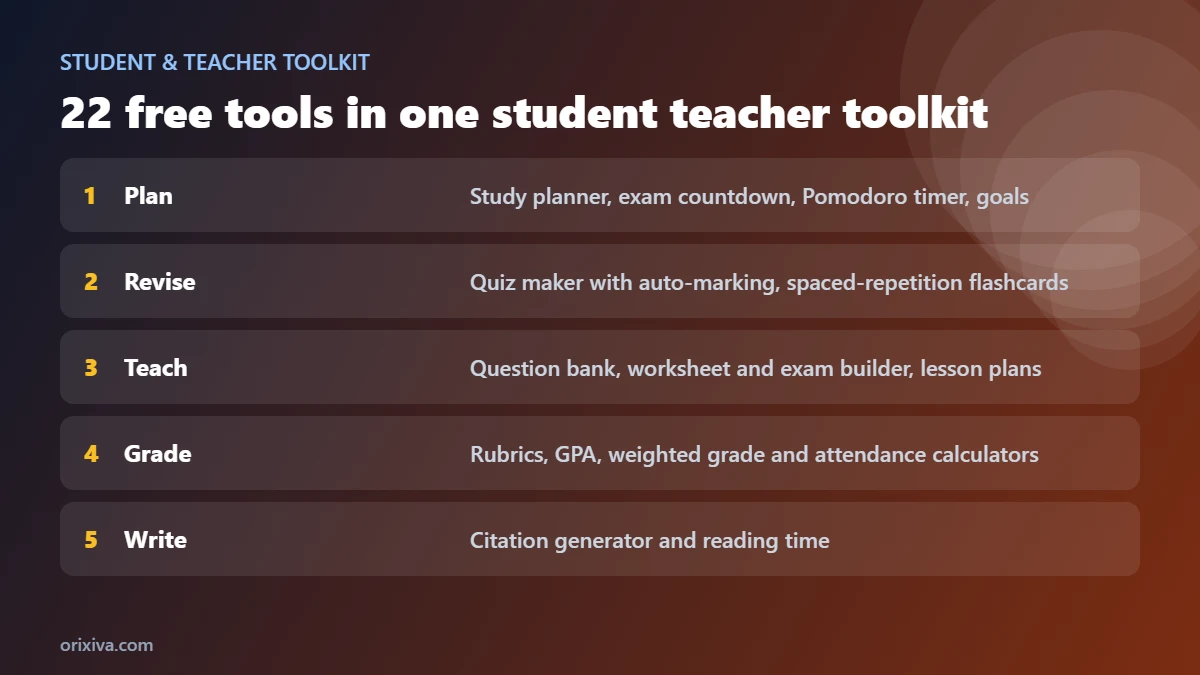
Use the search box or the category buttons at the top of the toolkit to find a tool quickly. Recently used tools appear first.
| Section | Tools |
|---|---|
| Plan & focus | Smart Study Assistant, Exam Countdown & Revision Planner, Study Timetable Planner, Assignment & Deadline Manager, Pomodoro Focus Timer, Study Goals & Habits |
| Revise & practise | Interactive Quiz & Auto-Grading, Spaced-Repetition Flashcards, Flashcard Creator |
| Teach & assess | Question Bank, Worksheet & Exam Builder, Quiz Question Generator, Worksheet Builder, Lesson Plan Builder, Rubric & Grading Sheet |
| Grades & progress | Student Progress Dashboard, GPA & Grade Calculator, Weighted Grade Calculator, Attendance Calculator |
| Writing & reading | Citation Formatter (APA, MLA, Chicago, Harvard, IEEE), Reading Time Calculator |
| Your data | Complete Backup & Restore |
How students can use the toolkit
- Add your exams. In Exam Countdown, enter each subject, its date, the topics and how confident you feel from 1 to 5.
- Build a plan. In Smart Study Assistant, press Use exam planner dates, set your free hours and rest days, then press Build my plan.
- Study in focus blocks. Start the Pomodoro Focus Timer for each session. Your focus minutes count towards your weekly goal automatically.
- Revise actively. Put key facts into Spaced-Repetition Flashcards and test yourself with the Interactive Quiz.
- Check progress. The Progress Dashboard shows your marks, quiz history, study minutes, open assignments and exam countdowns together.
Smart study planner and exam countdown
The Smart Study Assistant gives more sessions to subjects with an exam coming up and to subjects you marked as weak, and it never schedules a subject after its exam date. Each session has a concrete job, such as “Active recall: close the book and write what you remember”, “Practice questions, then check every mistake” or “Weak topic: algebra”. The two days before an exam switch to timed past-paper practice, and exam day is kept to a light review.
Tick sessions off as you finish them; your ticks are saved. You can print the plan, download it as a CSV file, or add every session to Google, Apple or Outlook calendar with the .ics file.
Prefer a fixed weekly routine? The Study Timetable Planner builds a repeating week around your fixed commitments, such as tuition or sports, and also exports to your calendar.
Online quiz maker with automatic marking
Write one question per line as Question | Answer, or load questions from your Question Bank or a sample subject. Then choose how the quiz works:
- Type the answer, multiple choice or a mix of both. Multiple-choice options are created from your other answers, or from wrong answers you add after a second bar:
Question | Answer | wrong 1; wrong 2. - All questions on one page, or one at a time with instant feedback after each answer.
- An optional time limit from 2 to 60 minutes, which submits automatically when time is up.
Marking is fair to real typing. Capital letters, extra spaces and full stops are ignored, numbers such as 56 and 56.0 match, and you can allow small spelling slips, for example “mitochondira” for “mitochondria”. If a question has more than one right answer, separate them with a semicolon: Who founded Pakistan? | Quaid-e-Azam; Jinnah.
After submitting you see your score, grade, time taken and a full answer review. Press Retry wrong answers to practise only the questions you missed. Results are saved to your history and to the Progress Dashboard, and can be downloaded as a CSV or printed.
Teachers can press Copy quiz link to give students the same quiz on their own devices. The questions and answers travel inside the link, so use it for practice rather than formal exams.
Spaced-repetition flashcards
Spaced repetition means reviewing a card just before you are likely to forget it, with longer gaps each time you remember it. It is one of the best-studied revision methods; this short overview of spaced repetition explains the idea and its history.
Spaced repetition shows you a card just before you are likely to forget it. After revealing the answer, rate the card Again, Hard, Good or Easy. Each button shows when you will see the card next. Cards you miss come back in the same session; cards you know well move days or weeks into the future.
The tool shows how many cards are due now, how many are new, how many are well learned (21 days or more between reviews) and your daily review streak. Use the keyboard for speed: Space to reveal, then 1 to 4 to rate. You can import a deck from the Flashcard Creator, limit new cards per day, and export your progress.
The separate Flashcard Creator is for building decks, studying with simple flip cards, printing double-sided cards and exporting to CSV or Anki.
Pomodoro timer and study goals
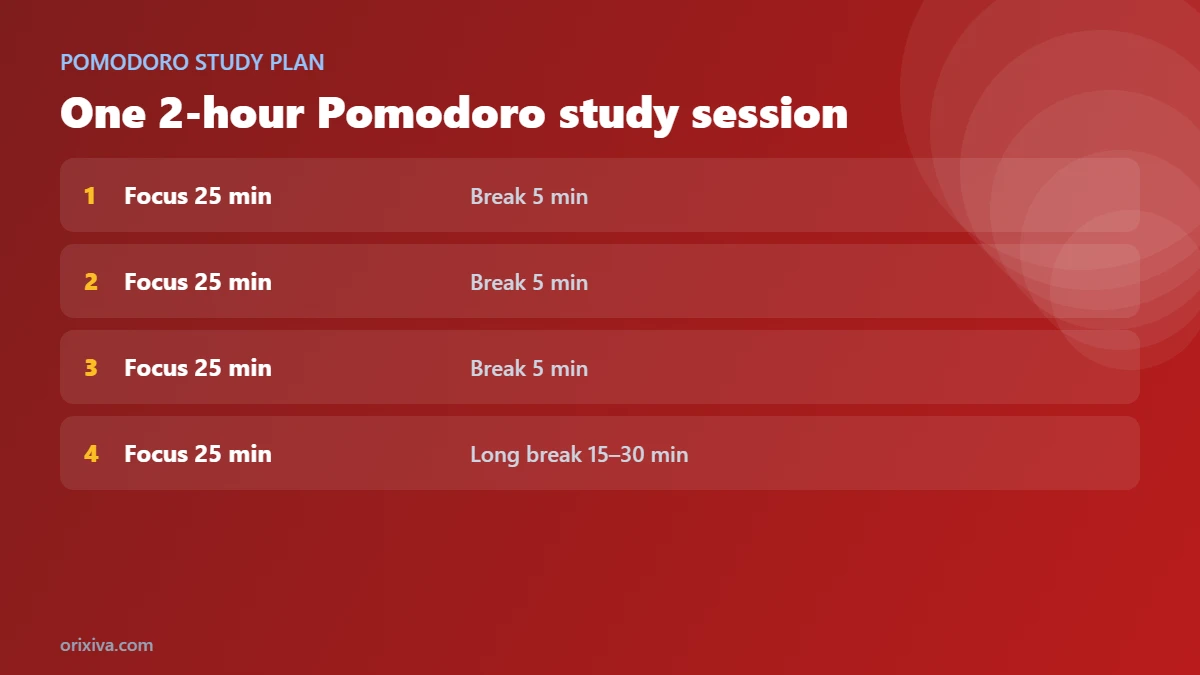
The method was created by Francesco Cirillo, and you can read the original description on the Pomodoro Technique website.
The Pomodoro Focus Timer runs focus blocks and breaks, with a long break after every few blocks. It stays accurate when you switch tabs, shows the countdown in the browser tab title, plays a short sound at the end and can start the next block automatically. Each finished block is logged with what you worked on, and a seven-day chart shows your focus time.
Study Goals & Habits sets a weekly target in minutes that resets every Monday. Log study with one tap, keep a daily streak, and see how many minutes a day you need to finish the week. Pomodoro minutes are added automatically, and past weeks are kept for comparison.
Tools for teachers and tutors
Question Bank
Save questions with answers, subject, topic, type, difficulty and marks. Search and filter, then send the visible questions to the Exam Builder or turn them into a practice quiz.
Worksheet & Exam Builder
Create an A4 question paper with school name, class, time allowed, marks per question and answer lines, plus a separate answer key.
Quiz Question Generator
Make printable quizzes with multiple choice, true/false, fill-in-the-blank and short-answer questions, in up to three shuffled versions to reduce copying.
Worksheet Builder
Print maths practice, word searches, matching exercises, fill-in-the-blank passages and handwriting lines, each with an answer key.
Lesson Plan Builder
Plan objectives, materials, starter, teaching, practice, assessment and homework, then print or download the plan.
Rubric & Grading Sheet
Score work against your own criteria, add notes and overall feedback, and print a feedback report for the student.
GPA, weighted grade and attendance calculators
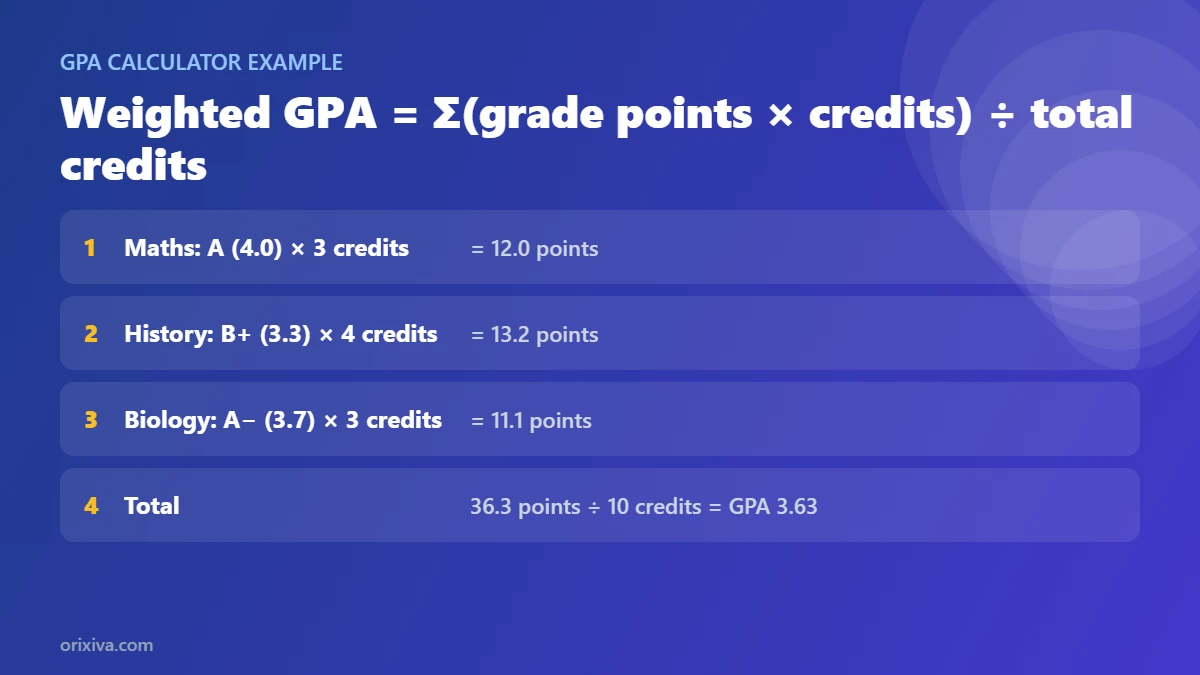
The GPA calculator works out semester and cumulative GPA on the US 4.0 scale, a weighted scale for Honors and AP/IB courses, or from percentages, including an HEC-style table used by many universities in Pakistan. It also tells you the GPA you need next term to reach a target. Universities use different tables, so always check your own grading policy.
The weighted grade calculator combines homework, quizzes and exams by their weights, can drop the lowest score in a category, and shows the score you need on your final exam.
The attendance calculator shows your percentage, how many classes in a row you must attend to reach a target such as 75%, and how many classes you can still miss while staying above it. Add subjects one per line to check each one.
Citation generator and reading time
The Citation Formatter creates references and in-text citations for books, journal articles and web pages in APA 7th, MLA 9th, Chicago author-date, Harvard and IEEE. Add references to a bibliography, which is sorted for you, then copy it with italics or download it. Always compare the result with your institution's style guide, as rules for unusual sources vary.
The Reading Time Calculator estimates reading and speaking time for any text, gives Flesch reading ease and grade level, lists the most used words, and tells you how many pages a day you need to read to finish a book by a date.
Saving, backup and moving devices
Your work saves automatically in your browser on this device. To move it to another browser, phone or computer, open Complete Backup & Restore, download the full JSON backup, and restore it on the other device. Download a fresh backup before clearing your browser data. The Clear saved data button at the top removes everything the toolkit saved on this device.
Common problems and fixes
My work is gone
Saved work lives in one browser on one device. It disappears if site data is cleared or you use a private window. Restore your latest backup file.
A correct quiz answer was marked wrong
Add the other wording as an extra accepted answer separated by a semicolon, or turn on “Accept small spelling mistakes”. Long written answers are better marked by a teacher with the Rubric tool.
The printout is cut off or includes the website
Use the print buttons inside each tool. They print only the sheet. In the print window, set the scale to 100% and paper to A4 or Letter.
The timer was slow in the background
The timer checks the real clock, so it stays correct. Some phones pause web pages when the screen is off; the timer catches up when you return.
The calendar file opened the wrong times
Smart study sessions start at 4 pm in the calendar file. Move them in your calendar, or use the Study Timetable Planner to set exact times.
Who is this toolkit for?
- School, college and university students preparing for exams, managing assignments and tracking grades.
- Teachers who need quick worksheets, question papers, rubrics and lesson plans.
- Tutors and academies who reuse question banks and share practice quizzes.
- Parents helping children plan revision and build study habits.
- Self-learners using flashcards and focus timers to learn new skills.
Privacy and limits
All tools run on your device. Nothing you type is sent to Orixiva's servers. Data is stored in your browser's local storage and stays there until you clear it. Quiz links contain the questions and answers inside the link, so anyone with the link can read them.
The toolkit is a study and teaching aid. Grade, GPA and attendance results are estimates based on the numbers and rules you enter, not official school or university records. There are no accounts and no automatic sync; use backups to move your work.
How we tested it
We opened every one of the 22 tools in Chromium-based browsers at desktop and phone sizes and checked for errors, then tested the main workflows: building study plans with exam dates, taking quizzes in every mode with typos and alternative answers, rating flashcards, running the focus timer while switching tools, sending questions from the bank to the exam builder, printing sheets, and backing up and restoring data. We also checked that the toolkit keeps its own design inside a WordPress theme. Please report anything that does not work in your browser in the comments.
Related free tools on Orixiva
- Free checklist maker with 78 templates, including exam preparation and study session checklists.
- Free file converter for documents and images.
- Free barcode and QR code generator.
- All free tools on Orixiva.
Tell us what to add next
Which tool helps you most, and what should we build next? Share your ideas in the comments. Teachers, tell us which worksheet types or exam formats your board uses. Please do not post student names or private data.
Frequently asked questions
Are these student and teacher tools really free?
Yes. All 22 tools, printing, exports and backups are free, with no sign-up and no watermark.
Do I need to create an account?
No. Your work saves in your browser. Use Backup & Restore to move it to another device.
How does the smart study planner decide what to study?
It gives more sessions to subjects with a close exam and to weak subjects, spreads subjects across each day, and stops scheduling a subject after its exam.
Can I make an online quiz for my students?
Yes. Build a quiz in the Interactive Quiz tool and press “Copy quiz link”. Students open the link on their own device. Answers are inside the link, so use it for practice.
Does the quiz accept spelling mistakes?
If you allow it, small slips in longer words are accepted. Capital letters, spaces and full stops are always ignored, and you can list several correct answers.
What is spaced repetition?
A method that shows each flashcard at growing intervals, just before you would forget it. Hard cards come back soon and easy cards later.
Can I print worksheets with answer keys?
Yes. The Worksheet Builder, Quiz Generator and Exam Builder all print a separate answer key.
Does the GPA calculator support Pakistani universities?
It includes an HEC-style percentage table. Universities differ, so check your own grading policy and adjust if needed.
How many classes can I miss and keep 75% attendance?
Enter classes held and attended in the Attendance Calculator. It shows exactly how many more classes you can miss and still stay at or above your target.
Which citation styles are supported?
APA 7th, MLA 9th, Chicago author-date, Harvard and IEEE, for books, journal articles and websites.
Does it work on a phone?
Yes. The toolkit adapts to small screens; the tool menu becomes a scrolling bar at the top.
Is my data private?
Yes. Nothing is uploaded. Everything stays in your browser unless you download it or create a quiz link.
Can I add the study plan to Google Calendar?
Yes. Download the .ics file from the Smart Study Assistant or the Study Timetable Planner and import it into Google, Apple or Outlook calendar.
Ready to study smarter? Scroll up, search for the tool you need, and start in seconds. No sign-up needed.