A sinking funds tracker for Excel and Google Sheets. Set a goal and date for each planned expense, log your deposits and see exactly how much to save every month.
Monthly saving amount worked out for each fund
Progress bars and % complete for every goal
Deposit and withdrawal log with fund drop-down
Room for 15 funds and 200 entries
Instant download after checkout, also sent by email
A sinking fund is money you set aside a little at a time for an expense you know is coming, such as car repairs, holiday gifts, insurance or a vacation. This sinking funds tracker for Excel and Google Sheets works out how much to save each month for every fund, based on your goal and target date, and tracks your progress as you log deposits.
What you can do with it
Know the monthly amount: each fund shows what to save per month to reach the goal on time.
Track deposits and withdrawals: log money in with a plus amount and money out with a minus amount.
See progress at a glance: % complete and a progress bar for every fund.
Plan the year: the Dashboard shows the total of all goals and the total to set aside each month.
Avoid surprise expenses: big yearly costs become small monthly amounts.
What’s included
Start Here: setup steps and colour guide
Dashboard: totals, overall progress and monthly amount
Funds: up to 15 sinking funds
Log: up to 200 deposits and withdrawals
How to use it in 4 steps
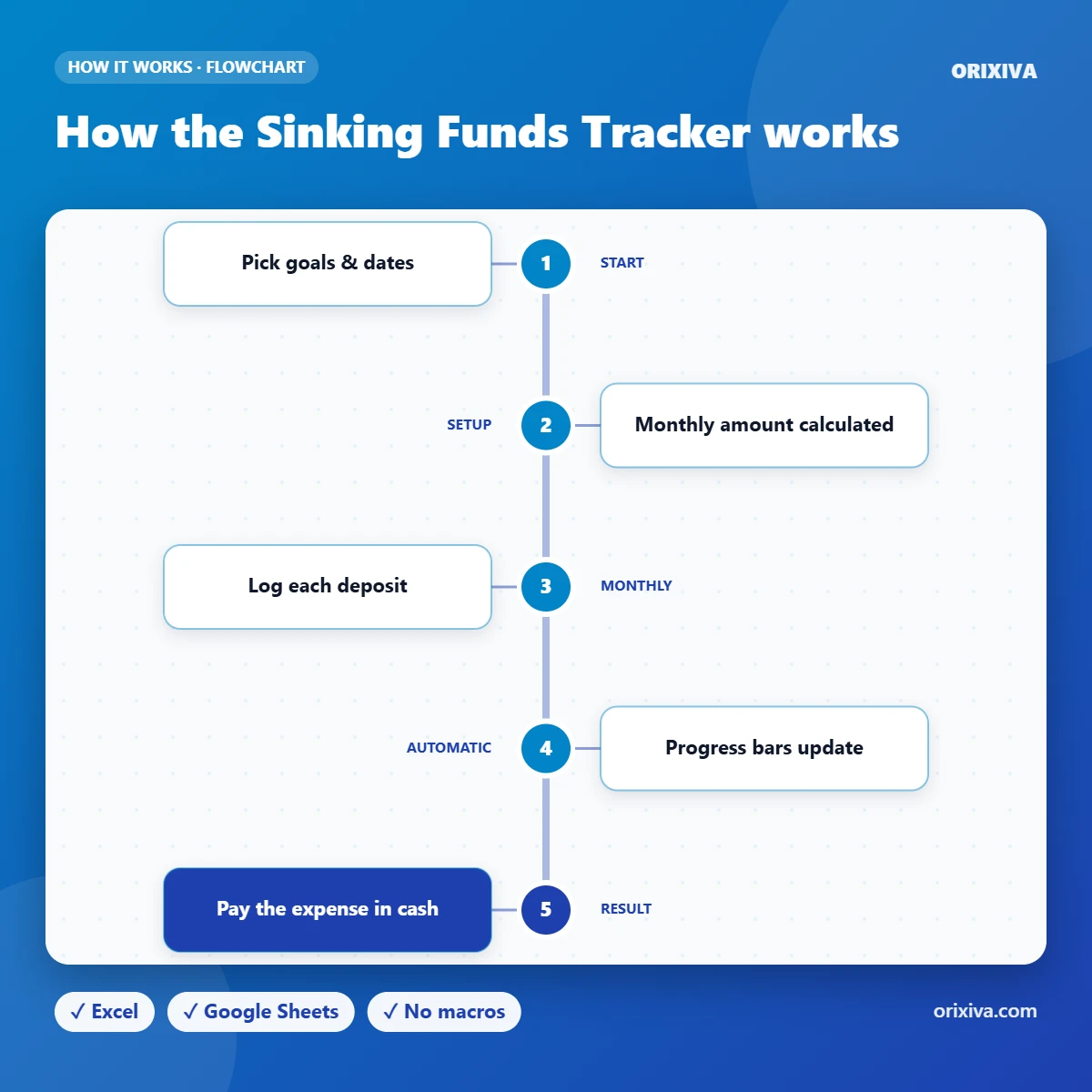
How the Sinking Funds Tracker works, step by step.
List your funds with goal and date.
Log each deposit or withdrawal.
Save the “Save per month” amount for each fund.
Review the Dashboard every month.
Who it is for
Anyone using a budget who wants to stop yearly expenses from becoming emergencies. It pairs well with a monthly budget or paycheck budget.
File details
Format: .xlsx workbook with 4 tabs, room for 15 funds and 200 entries
Works in: Microsoft Excel 2016 or newer, Microsoft 365, Excel for Mac and Google Sheets (File > Import)
No macros: plain formulas only, so it opens safely on any device
Free sample: a 3-entry version with the same formulas, so you can test it first
Delivery: instant download after checkout, also sent by email
Frequently asked questions
What is a sinking fund?
A sinking fund is a savings pot for a planned expense. You divide the cost by the months left and save that amount each month.
How does the tracker calculate the monthly amount?
It takes the amount still needed for a fund and divides it by the number of months until the target date. If the date has passed, it shows the full remaining amount.
Can I record money I take out?
Yes. Enter a negative amount on the Log tab, for example -65 for a car repair. The fund balance goes down automatically.
Does it work in Google Sheets?
Yes. Import the file into Google Sheets. The fund drop-down and progress bars keep working.
How many funds can I track?
The full version holds 15 funds and 200 log entries. The free sample holds 3 of each.
Share how you use it
Bought this sinking funds tracker? Leave a review below with one tip from your own setup, such as a category you added or how often you update it. Real tips from buyers help the next person decide, and we read every review when planning updates.
Licence
For personal use or use in one business. Please do not resell, share or redistribute the file.
Reviews
There are no reviews yet.
Be the first to review “Sinking Funds Tracker – Excel & Google Sheets Savings Goals Template”Cancel Reply
Questions about this template
Does it work in Google Sheets?+
Yes. Open it in Microsoft Excel, or upload it to Google Sheets.
Is it a subscription?+
No. You pay once and keep the file.
How do I get my file?+
A download link appears right after checkout and is also sent to your email.
Can I edit it?+
Yes. Change labels, categories and colors to fit your needs.











Reviews
There are no reviews yet.