Try our free AI tools – no sign-up needed!


How to Make an Invoice: 7 Easy Steps With Real Examples
Looking for the free invoice generator? Scroll down to the blue button, or open it now. No sign-up, no login.
Jump to the free tool ↓Sending your first invoice can feel strangely stressful. What must it say? How do you work out tax? What if the client is in another country? This guide shows you how to make an invoice step by step, in plain English, with real examples you can copy.
You will also see how to do every step in the free Orixiva invoice generator, which runs in your browser and needs no account.
Key takeaways
- Learning how to make an invoice comes down to a few parts: every invoice needs a unique number, dates, both parties’ details, a list of what you sold, the total and how to pay.
- Pick the right document first: a quote before the work, an invoice after it, a receipt once you are paid.
- Work out discounts before tax, and say clearly whether prices include tax.
- Save the invoice as a PDF so it looks the same on every device.
- Record payments as they arrive, so you always know who still owes you.
What is an invoice, and when do you send one?
An invoice is a document that asks a customer to pay for goods or services you have delivered. It is also a record for both of you: your client uses it to approve the payment, and you use it for your accounts and tax.
Send an invoice after the work is done or the goods are shipped. If you need money up front, send a deposit invoice first. If you only want to offer a price, send a quotation instead. You will find more on that choice further down.
How to make an invoice in 7 steps
Here is how to make an invoice from start to finish. Each step shows what to write and where to do it in the free invoice generator.
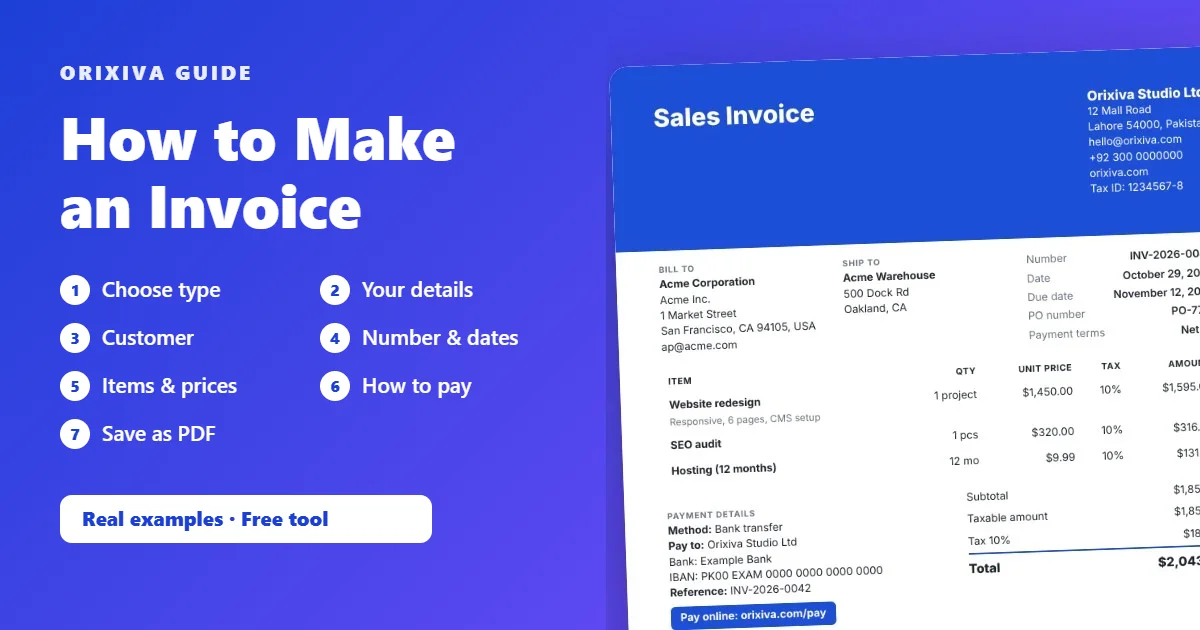
- Choose the right document type. Start with “Sales Invoice” for most jobs. The tool also offers service, tax, VAT, GST, proforma, deposit, milestone, hourly and e-commerce invoices, 66 document types in total. The type sets the title and the number prefix, such as INV for invoices.
- Add your business details. Write your business name, address, email and phone. Add your tax or registration number if you have one, and upload your logo. Press “★ Use as my default business” so you never type this again.
- Add the customer. Enter the client’s name, company and billing address. If the goods go somewhere else, add a separate ship-to name and address. Press “Save customer” to reuse them next time.
- Set the number and dates. Keep the suggested number (for example INV-2026-0001) or type your own. The tool warns you if a number is already used. Pick the issue date, then tap “Net 15” or “Net 30” to set the due date in one click.
- List what you are charging for. Add one line per product or service with quantity and unit price. Open “More” on a line for a description, SKU, discount, tax rate or product image. Totals update as you type.
- Add payment instructions. Say how to pay: bank transfer details, PayPal or Wise email, or your own payment link. You can turn the link into a QR code so clients can scan and pay from their phone.
- Check it, then save as PDF. Look over the live preview, choose a template and press “Print / PDF”. In the print window, choose “Save as PDF”. Attach the PDF to your email or message and send it.
Tip: fill in your business onceThe ★ buttons save your business details, payment instructions, notes and terms as defaults. Every new invoice then starts already filled in, so step 2 and step 6 take seconds.
5 real examples: how to make an invoice for different jobs
Seeing finished numbers is the fastest way to learn how to make an invoice that is correct. Each example below was calculated with the same engine the tool uses.
Example 1: A freelancer billing an overseas client
This is how to make an invoice for a service with no tax. Aisha, a designer, bills a client in the United States in dollars. No sales tax applies to her service, so she leaves the tax rate empty.
Invoice INV-2026-0007
To: Northwind LLC · Due: Net 15
Currency: USDTo: Northwind LLC · Due: Net 15
| Item | Qty | Price | Amount |
|---|---|---|---|
| Logo design package | 1 | $450.00 | $450.00 |
| Extra revisions (hours) | 3 | $35.00 | $105.00 |
| Total due | $555.00 | ||
She adds her Payoneer details in Payment instructions and a QR code that opens her payment link.
Example 2: A UK online shop with prices that include VAT
Here is how to make an invoice when prices include tax. A small shop sells mugs and a tea set at prices that already include 20% VAT. It chooses “Prices are: Tax-inclusive”, so the tool works out the VAT inside the price instead of adding it on top.
VAT Invoice INV-2026-0112
Online store order #1042
Currency: GBPOnline store order #1042
| Item | Qty | Price incl. VAT | Amount |
|---|---|---|---|
| Stoneware mug | 2 | £12.00 | £24.00 |
| Tea set | 1 | £18.50 | £18.50 |
| VAT 20% (included) | £7.08 | ||
| Shipping | £3.95 | ||
| Total | £46.45 | ||
The customer pays £46.45. The invoice shows the £7.08 of VAT already inside the £42.50 of goods.
Example 3: An agency in the UAE with a discount and a deposit
This example shows how to make an invoice with a discount, tax and a deposit together. An agency gives a 10% discount on a monthly package, charges 5% VAT and has already received an AED 3,000 deposit.
Tax Invoice INV-2026-0045
Monthly retainer · November
Currency: AEDMonthly retainer · November
| Social media retainer | AED 8,000.00 |
| Ads management | AED 2,500.00 |
| Subtotal | AED 10,500.00 |
| Discount 10% | −AED 1,050.00 |
| VAT 5% | AED 472.50 |
| Total | AED 9,922.50 |
| Deposit received | −AED 3,000.00 |
| Amount due | AED 6,922.50 |
The discount comes off before tax, so VAT is charged on AED 9,450.00, not on the full price.
Example 4: A Canadian contractor charging two taxes
Some places charge more than one sales tax. A contractor in British Columbia bills 8 hours at CA$125, with 5% GST on the line and 7% PST added as an extra tax line.
ResultSubtotal CA$1,000.00 + GST 5% CA$50.00 + PST 7% CA$70.00 = total CA$1,120.00. Use “+ Add tax line” under Discounts, tax & charges for the second tax.
Example 5: An exporter shipping goods abroad
A manufacturer sends 200 leather wallets at €4.75 and 50 belts at €12.40 to a buyer in Germany, plus €180 freight. The goods come to €1,570.00 and the total is €1,750.00.
That is how to make an invoice for exports: for shipments, choose the “International Commercial Invoice” template. It adds boxes for exporter, consignee and shipment, and lets you add custom fields such as Incoterms, country of origin and HS codes.
Check local rulesTax and customs rules differ by country. The UK government explains what an invoice must include, and the European Commission covers EU VAT invoicing rules. Always confirm with your own tax authority or accountant.
How to handle tax, discounts, deposits and part payments
Knowing how to make an invoice add up correctly matters most, because most invoice mistakes happen in the totals. Here is the order the tool follows, so your numbers always add up.
Discounts come before tax
You can discount a single line (for example 10% off one service) or the whole invoice. A whole-invoice discount is shared across the lines by value, so tax is charged on what the customer really pays.
Tax-exclusive or tax-inclusive prices
If your prices are before tax, the tax is added on top. If your prices already include tax, as in many shops, switch to tax-inclusive and the tool extracts the tax instead. Nothing is taxed unless you enter a rate.
Withholding tax
In some countries the client keeps back a share of the invoice for the tax office. Add an extra tax line with a negative rate. For example, a PKR 150,000 service with −10% withholding shows a net amount of PKR 135,000.
Deposits, credits and part payments
If a client has paid a deposit, enter it and the invoice shows “Amount due” after the deposit. If they pay in parts, record each payment as it arrives. For example, a $750 invoice with a $400 payment recorded shows a balance of $350, and the tool offers to mark it “Partially paid”.
Different currencies
Choose from 52 currencies. Each uses the right number of decimals, such as 0 for Japanese yen and 3 for Kuwaiti dinar. If your client wants to see a rough amount in their currency, add the exchange rate, its source and date, and the converted total is printed as information only.
How to make an invoice from a quote, and other documents you will need
Once you know how to make an invoice, the related documents are easy. An invoice rarely lives alone. Here is the usual life of a job and the document for each moment:
| Moment | Document | In the tool |
|---|---|---|
| Client asks for a price | Quotation or estimate | Create a Quotation |
| Client accepts | Invoice (or a deposit invoice first) | ⇄ Convert → Invoice |
| Goods are shipped | Delivery note or packing list | ⇄ Convert → Delivery note |
| Client pays | Receipt | Record payment → Receipt |
| Something is returned or wrong | Credit note | ⇄ Convert → Credit note |
Each conversion copies the customer and items into a new document with its own number. The original is never changed. A receipt can only be created from a payment you have actually recorded, and making one does not mark the invoice as paid unless you choose to.
How to make your invoice look professional
Part of knowing how to make an invoice is making it easy to read. A clean invoice gets paid faster because the client can find the total and the due date in seconds. These design features help:
47 templates
From minimal and corporate to store order, payment request, commercial and receipt layouts. Changing template keeps all your content.
Your brand
Logo, two accent colours, heading and body fonts, font size, and a signature image with name and title.
Page setup
A4, US Letter or Legal, portrait or landscape, margins, header and footer text, and page numbers on long invoices.
Columns you choose
Show or hide image, SKU, unit, discount and tax columns, and rename the SKU column to “HS code” or “Licence”.
7 label languages
Print labels in English, Spanish, French, German, Portuguese, Arabic or Urdu. Arabic and Urdu use right-to-left layout.
QR code
Add a QR code with your payment link or website so clients can pay from their phone.
Need a cleaner logo first? Remove its background with the free background remover, or resize it with the image resizer.
How to keep track of invoices and payments
Knowing how to make an invoice is half the job. Getting paid, and knowing who has paid, is the other half.
My Documents
Every document saves automatically. Search by number or customer, filter by status, and spot overdue invoices at a glance.
Clients and products
Save customers and a catalog of products or services, then add them to a new invoice in two clicks.
Reports
See invoiced, paid, outstanding and overdue amounts by month, customer and document type, for each currency.
Import store orders
Export orders from WooCommerce, Shopify or a marketplace as CSV and turn them into invoices. Orders already imported are skipped.
Backup and restore
Download one backup file with all documents, customers, products and templates, and restore it on another device.
Undo and duplicate
Undo a change, duplicate last month’s invoice for a repeat client, and export a single document as a JSON file.
Everything is stored in your own browser, not on a server. Read how our client-side processing keeps your data on your device, and remember to download a backup now and then.
How to make an invoice on your phone
You do not need a computer. The tool works in the browser on Android and iPhone, so you can make and send an invoice on the bus, before you even get home.
- Open the free invoice generator in Chrome or Safari.
- Use the Editor tab to fill in the details. Item lines stack neatly on a small screen.
- Switch to the Preview tab, or open Full screen, to check the layout.
- Tap Print / PDF and choose “Save as PDF” (Android) or share the print preview as a PDF (iPhone).
- Send the PDF by email, WhatsApp or any messaging app.
Your work saves on that phone. To continue on a computer, download a backup and restore it there.
7 invoice mistakes that delay payment
Even when you know how to make an invoice, small slips can slow down payment. Watch out for these.
- No due date. “Due on receipt” or “Net 30” tells the client exactly when to pay.
- Vague descriptions. “Work in October” invites questions. “Homepage redesign, 2 revision rounds” does not.
- Repeated invoice numbers. Every invoice needs its own number. The tool warns you about duplicates.
- Tax added twice. If your prices already include tax, use tax-inclusive mode.
- Missing payment details. A client who has to ask how to pay usually pays later.
- Wrong currency. Agree the currency before you start, and show it clearly.
- Editing a sent invoice. If you made a mistake after sending, issue a credit note and a new invoice instead.
Your turn: What is your best tip for getting invoices paid on time? Which payment terms work for your clients? Share it in the comments to help other freelancers and small businesses. Please leave out client names and bank details.
Make your invoice now, free
Now you know how to make an invoice. Open the Orixiva free invoice generator, follow the 7 steps above and download a professional PDF in a few minutes. No sign-up, no login, nothing uploaded.
Create a free invoice → 47 templates · 52 currencies · works on phone and computerInvoice questions people often ask
What is the difference between an invoice and a bill?
They are the same document seen from two sides. You send an invoice to ask for payment; your client receives it as a bill to pay.
Can I make an invoice without a registered business?
Yes, in many countries freelancers and sole traders can invoice under their own name. You may need to register for tax once you pass certain limits, so check your local rules.
What does Net 30 mean on an invoice?
Net 30 means the full amount is due within 30 days of the invoice date. Net 15 means 15 days, and “due on receipt” means pay as soon as possible.
How should I number my invoices?
Use a simple sequence that never repeats, such as INV-2026-0001, INV-2026-0002. Many businesses restart the count each year and keep the year in the number.
How do I invoice a client in another country?
Agree the currency first, write the client’s full address and tax ID if they have one, and give international payment details such as IBAN and SWIFT or a Wise or PayPal account.
How do I fix a mistake on an invoice I already sent?
Do not edit the sent invoice. Issue a credit note that cancels or reduces it, then send a corrected invoice with a new number, so both records stay clear.
Can I add a late payment fee?
You can state a late fee in your terms if the law where you trade allows it, and add it as an extra line on a later invoice. Agree it with the client in advance.
How long should I keep copies of my invoices?
Tax authorities usually require several years of records, and the exact period depends on your country. Keep PDFs and a backup file somewhere safe.
How to make an invoice in PDF?
Fill in the invoice, press Print / PDF and choose “Save as PDF” as the printer. The file keeps sharp text and the page size you chose.
Is a PDF invoice valid?
In most places a PDF sent by email is accepted as an invoice. Some countries require e-invoicing in a set format for certain businesses, so check if that applies to you.

[…] list hours as decimals so totals multiply cleanly. See how to make an invoice for a worked […]