Try our free AI tools – no sign-up needed!


How to Do a Subscription Audit: Find, Cancel and Stop Paying for Subscriptions You Forgot
Short answer: A subscription audit takes about 30 minutes. Go through 3 months of bank and card statements (12 months for yearly plans), check the subscription lists in your phone's app store, PayPal and Amazon, and write every recurring charge down with its price and billing cycle. Convert each one to a monthly cost, divide by how often you use it, and cancel anything with a high cost per use. The free Orixiva subscription cost calculator does the maths, shows what cancelling saves and creates renewal reminders.
Key takeaways
- Subscriptions add up quietly. CNET's 2026 survey put the average at $111 a month, with about $252 a year wasted on unused services.
- Look in more than one place: bank statements, app stores, PayPal, Amazon and your email all hide recurring charges.
- Cost per use is the fastest way to decide what to keep.
- Cancel through the same channel you pay through, then check the next statement.
- A yearly review and trial reminders stop the list from growing back.
Why subscriptions creep up without you noticing
Each subscription looks small on its own. A few dollars for cloud storage, a little more for music, a streaming service you signed up to for one show. The problem is that they never stop unless you stop them.
In CNET's 2026 subscription survey, reported in July 2026, the average American spent $111 a month on subscriptions, about $1,332 a year, up 23% on the previous year. People also wasted roughly $252 a year on subscriptions they did not use.
Four things usually push the total up:
- Free trials that turn into paid plans if you forget to cancel.
- Yearly renewals that charge a large amount once and are easy to forget for the other 11 months.
- Price increases that arrive by email and are rarely read.
- Overlap: two music apps, two cloud plans or several streaming services that do the same job.
The 30-minute subscription audit, step by step
- Download your statements. Get the last 3 months for every bank account and card. For yearly plans you need 12 months, so also search for words like "annual" or "renewal".
- Check your app store lists. On iPhone, open Settings, tap your name, then Subscriptions. On Android, open the Google Play Store, tap your profile picture, then Payments & subscriptions and Subscriptions.
- Check PayPal and Amazon. PayPal lists recurring payments under automatic payments in its settings. Amazon shows memberships and subscriptions in your account.
- Search your email for "receipt", "renewal", "your trial" and "subscription" to catch anything billed to a card you forgot about.
- List everything in one place with its price, billing cycle (weekly, monthly, yearly) and next renewal date.
- Add how often you use each one, roughly, per month. A guess is fine.
- Mark each one Keep, Review or Cancel and act on the Cancel list the same day.
Shortcut: type your list straight into the subscription cost calculator. It converts every billing cycle to a monthly and yearly cost, ranks them and keeps the list in your browser for next time.
Where hidden subscriptions live
| Where to look | How to check | What you often find |
|---|---|---|
| Bank and card statements | Last 3 to 12 months, search "recurring" | Gyms, software, news sites, meal kits |
| iPhone / iPad | Settings › your name › Subscriptions | App upgrades, cloud storage, dating and fitness apps |
| Android | Play Store › profile › Payments & subscriptions | App subscriptions and trials |
| PayPal | Settings › Payments › automatic payments | Old services that still have permission to charge you |
| Amazon | Account › Memberships & subscriptions | Prime, channels, Subscribe & Save |
| Email inbox | Search "renewal", "trial", "receipt" | Yearly plans and forgotten trials |
Keep, rotate or cancel? Use cost per use
The fairest test of a subscription is not its price but its cost per use: the monthly cost divided by how many times you use it each month.
| Subscription (example) | Per month | Uses per month | Cost per use | Decision |
|---|---|---|---|---|
| Music streaming | $11.99 | 25 | $0.48 | Keep |
| Cloud storage | $2.99 | 30 | $0.10 | Keep |
| Video streaming | $15.49 | 8 | $1.94 | Keep |
| Software (yearly $99.99) | $8.33 | 10 | $0.83 | Keep |
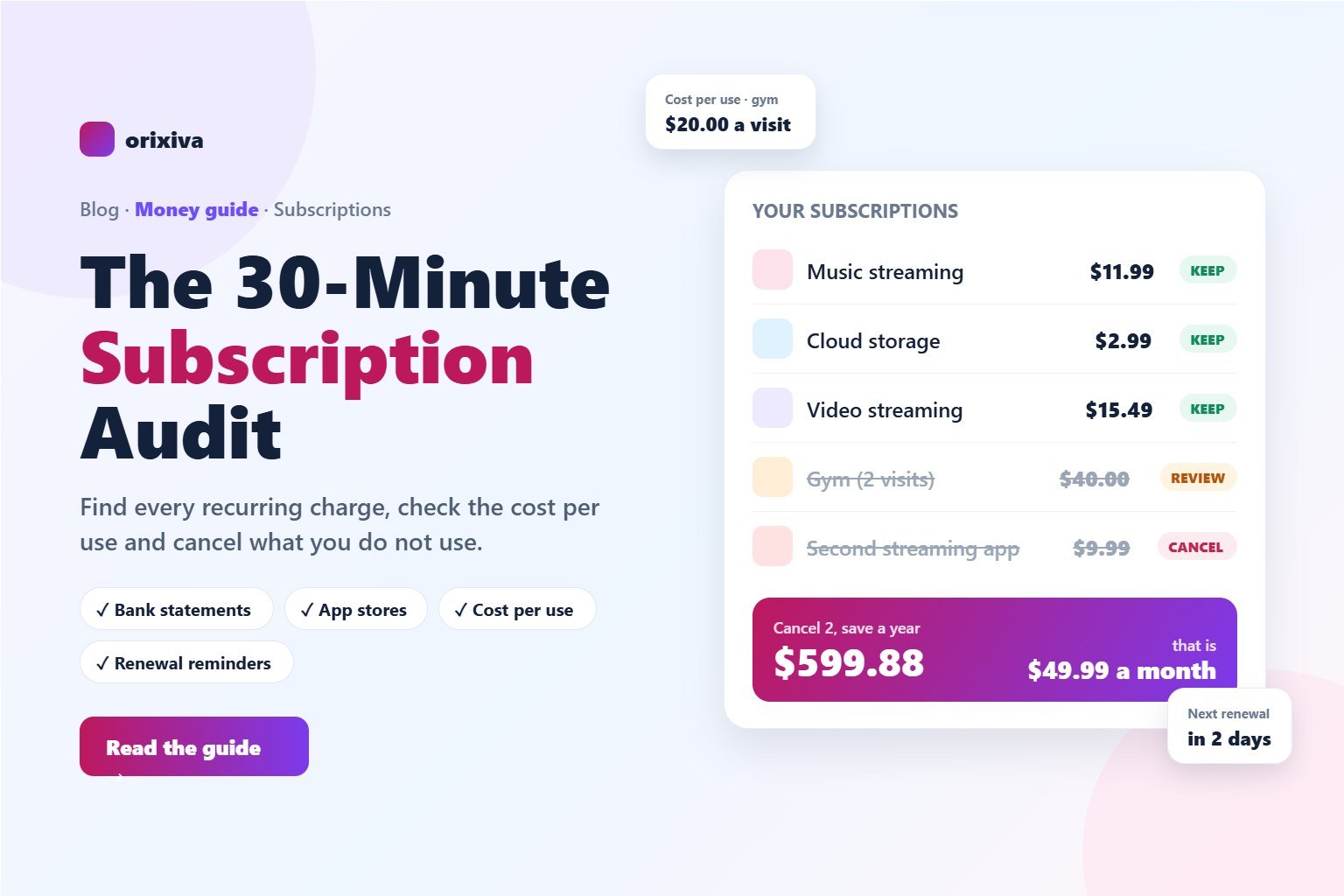
| Gym membership | $40.00 | 2 | $20.00 | Review |
| Second streaming app | $9.99 | 1 | $9.99 | Cancel or rotate |
This list costs $88.79 a month, or about $1,065 a year. Cancelling the gym and the second streaming app saves $49.99 a month ($599.88 a year). If that money were invested every month at an assumed 7% yearly return, it would grow to roughly $8,650 in 10 years. That is an illustration, not a promise, because real returns go up and down.
Rotate
Keep one streaming service at a time. Watch what you want for a month, cancel, and switch to the next.
Downgrade
Many services have a cheaper plan with ads, fewer screens or less storage that is enough for you.
Share
Family and household plans often cost less than two or three separate accounts.
Pay per use
If you use something once a month, a day pass or single purchase is usually cheaper.
How to cancel a subscription properly
- Cancel where you pay. A subscription bought through the App Store or Google Play must be cancelled there. Deleting the app does not cancel it.
- Keep proof. Take a screenshot of the cancellation confirmation or save the email.
- Check the next statement. Make sure the charge really stopped.
- Remove saved payment permissions in PayPal or your card's online banking for services you have left.
- If charges continue, contact the company first, then ask your bank or card provider about disputing the charge.
Know your rights (US): the FTC's "click-to-cancel" rule was struck down by a federal appeals court in July 2025, and in 2026 the FTC was still consulting on a replacement. The federal Restore Online Shoppers' Confidence Act (ROSCA) still requires online sellers to disclose terms clearly, get your consent and give you a simple way to stop recurring charges. Several states, including California and New York, have their own automatic renewal laws. Rules differ by country, and this is general information, not legal advice.
Annual or monthly plan?
A yearly plan is cheaper per month, but only if you keep the service long enough. Divide the yearly price by the monthly price to find the break-even point.
Example: a plan costs $12.99 a month or $119.99 a year. 119.99 ÷ 12.99 = 9.2 months. If you are sure you will use it for at least 10 months, pay yearly. If not, start monthly and switch once you know you will keep it. The calculator's Annual vs monthly tab works this out for any two prices.
Stop subscriptions creeping back
- Set a reminder the day you start a free trial, two days before it ends.
- One in, one out: when you add a new service, drop an old one.
- Put renewals in your calendar. The calculator can download reminders for every renewal date.
- Use one card for subscriptions so they are easy to spot on one statement.
- Repeat the audit once a year, or whenever a price increase email arrives.
See what your subscriptions really cost
Monthly and yearly totals, cost per use, savings from cancelling, renewal reminders and annual vs monthly plans. Free, and your list stays in your browser.
Open the subscription cost calculator →Frequently asked questions
How do I find all my subscriptions?
Check the last 3 months of bank and card statements (12 months for yearly plans), the subscription lists in your iPhone settings or Google Play Store, PayPal automatic payments, your Amazon memberships and your email for renewal receipts.
How often should I do a subscription audit?
Once a year is enough for most people, plus a quick check whenever you start a free trial or receive a price increase email.
How much does the average person spend on subscriptions?
CNET's 2026 survey, reported in July 2026, found an average of $111 a month, about $1,332 a year, with roughly $252 a year wasted on subscriptions people did not use.
Does deleting an app cancel the subscription?
No. You must cancel in the App Store or Google Play subscriptions list, or on the company's website if you subscribed there.
What is a good cost per use?
It depends on the service, but if one use costs more than buying it once (a cinema ticket, a gym day pass, a single e-book), the subscription is probably not worth it for you.
Is a yearly subscription cheaper than monthly?
Only if you keep it past the break-even point. Divide the yearly price by the monthly price; for $119.99 a year versus $12.99 a month, that is about 9.2 months.
What can I do if a company keeps charging me after I cancel?
Contact the company with your cancellation proof first. If the charges continue, ask your bank or card provider about disputing them and removing the company's permission to charge you.
Over to you
How much did your audit save? Share the number (and the subscription you were most surprised to find) in the comments, and we will add the best tips to this guide.
Related guides and tools
- Subscription cost calculator and tracker
- Financial calculators: loans, savings and interest
- A practical guide to 11 money tools
- Date calculator: days until a renewal
Sources: WFSB: Average American now spending $111 a month on subscriptions (CNET survey, July 2026) · WCPO: Subscription creep, $252 a year on unused services · FTC: Restore Online Shoppers' Confidence Act · US subscription cancellation rules in 2026.