Try our free AI tools – no sign-up needed!


Digital Storage Calculator: GB vs GiB and Why a 1TB Drive Shows About 931GB
Need the number now? The free digital storage converter changes GB to GiB, MB to KB, bits to bytes and 12 more units, with no login and the working shown.
Jump to the free tool ↓You buy a 1TB drive, plug it in, and the computer says 931GB. Nothing is missing. The box and the computer are using two different meanings of “gigabyte”. A digital storage calculator makes this visible in seconds, and it also helps when you plan backups, phone storage, cloud plans or download times.
This guide explains bits and bytes, decimal (GB) and binary (GiB) units, and how to estimate how many photos, songs or videos fit on a device. You can check every number in the free Orixiva digital storage converter, which works online, free and without login, and lists all 15 storage units at once.
Key takeaways
- 1 byte = 8 bits. Network speeds use bits (Mbps); files use bytes (MB).
- Decimal units: 1 KB = 1,000 bytes, 1 GB = 1,000,000,000 bytes, 1 TB = 10¹² bytes.
- Binary units: 1 KiB = 1,024 bytes, 1 GiB = 1,073,741,824 bytes.
- A 1TB drive holds 10¹² bytes, which is 931.32 GiB. Some systems show GiB but label it “GB”.
- The Orixiva digital storage calculator converts bits, bytes, decimal (kB to PB) and binary (KiB to PiB) units instantly.
Bits and bytes: the starting point
A bit is a single 0 or 1. A byte is 8 bits, enough to store one simple character such as “A”. Everything larger is built from bytes:
Bit (b)
The smallest unit. Internet speeds are measured in bits per second: Mbps, Gbps.
Byte (B)
8 bits. File sizes, memory and drives are measured in bytes: KB, MB, GB, TB.
The capital and small letters matter: Mb (megabit) is one eighth of MB (megabyte). A “100 Mb” connection and a “100 MB” file are very different things.
Decimal GB vs binary GiB
Two systems use similar names:
Decimal (SI)
Powers of 1,000. Used by drive makers, phone makers and network speeds.
1 GB = 1,000,000,000 B
- kB, MB, GB, TB, PB
- Matches the metric “kilo, mega, giga”
Binary (IEC)
Powers of 1,024. Used for memory and by some operating systems.
1 GiB = 1,073,741,824 B
- KiB, MiB, GiB, TiB, PiB
- “Gi” stands for gibi (2³⁰)
According to NIST’s page on binary prefixes, the IEC approved the names kibi, mebi and gibi in December 1998 to end the confusion of using “kilo” for 1,024. Many programs still write “GB” when they mean GiB, which is the root of the problem.
The gap grows with each prefix
How much bigger the binary unit is than the decimal unit.
KiB vs kB
+2.4%
MiB vs MB
+4.9%
GiB vs GB
+7.4%
TiB vs TB
+10.0%
PiB vs PB
+12.6%
Bars to scale. This is why the “missing space” looks bigger on larger drives.
Why a 1TB drive shows about 931GB
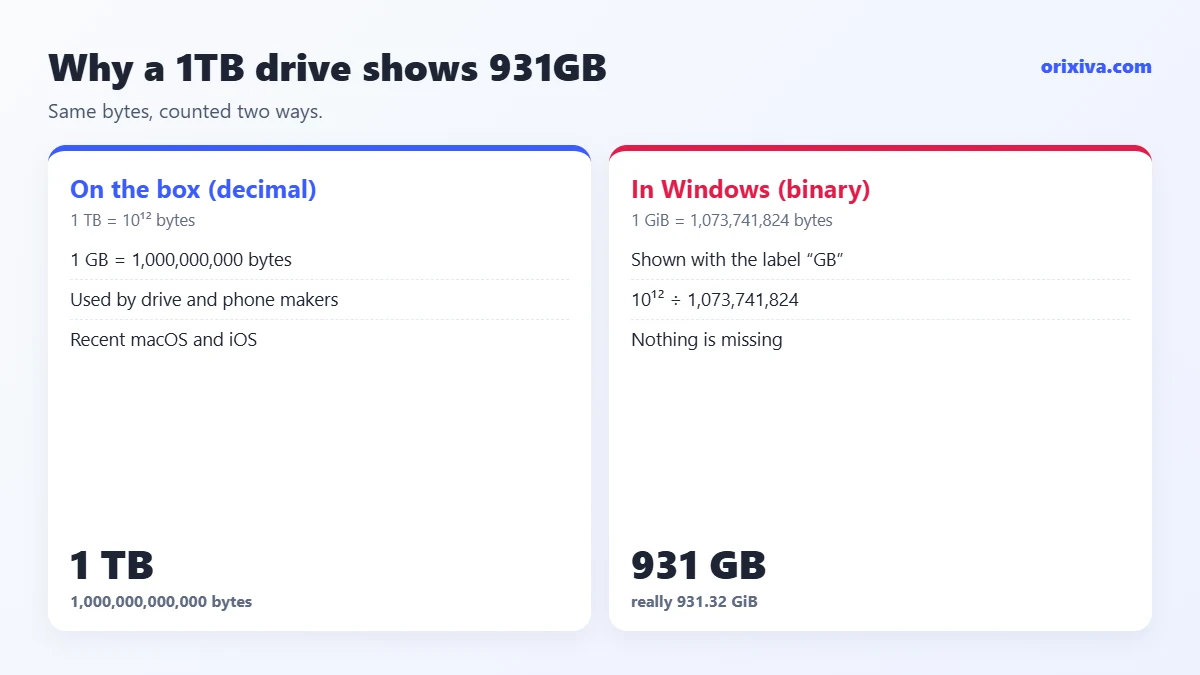
- The maker counts in decimal. 1 TB = 1,000,000,000,000 bytes.
- The system counts in binary. 1 GiB = 1,073,741,824 bytes.
- Divide: 1,000,000,000,000 ÷ 1,073,741,824 = 931.32 GiB.
- The label says “GB”. Windows File Explorer shows this as “931 GB”, so it looks like 69 GB vanished.
Formatting and system files then use a little more space, so the free space you see is lower again. Apple explains in its guide on how storage capacity is measured on Apple devices that makers use decimal units, where 1 GB is 1 billion bytes; recent versions of macOS and iOS also report storage in decimal, so a 1TB drive shows close to 1TB there.
Where the 1,024 habit came from
Computer memory is built from chips whose sizes are powers of two, so early programmers used “kilobyte” for 1,024 bytes because it was close to 1,000. As drives grew to gigabytes and terabytes, the small difference became a large one, which is why the separate binary names were introduced.
How common systems label sizes
- Drive boxes, phones and cloud plans: decimal GB and TB.
- Windows File Explorer: binary values, labelled GB and TB.
- Recent macOS and iOS: decimal values, as described in Apple’s guide.
- Linux tools: vary; many show GiB and MiB explicitly, which removes the ambiguity.
Size vs size on disk
File properties may show two numbers. “Size” is the data in the file; “size on disk” is the space it occupies, rounded up to whole blocks of the file system. Thousands of tiny files can take noticeably more space on disk than their sizes add up to.
The same gap on small devices
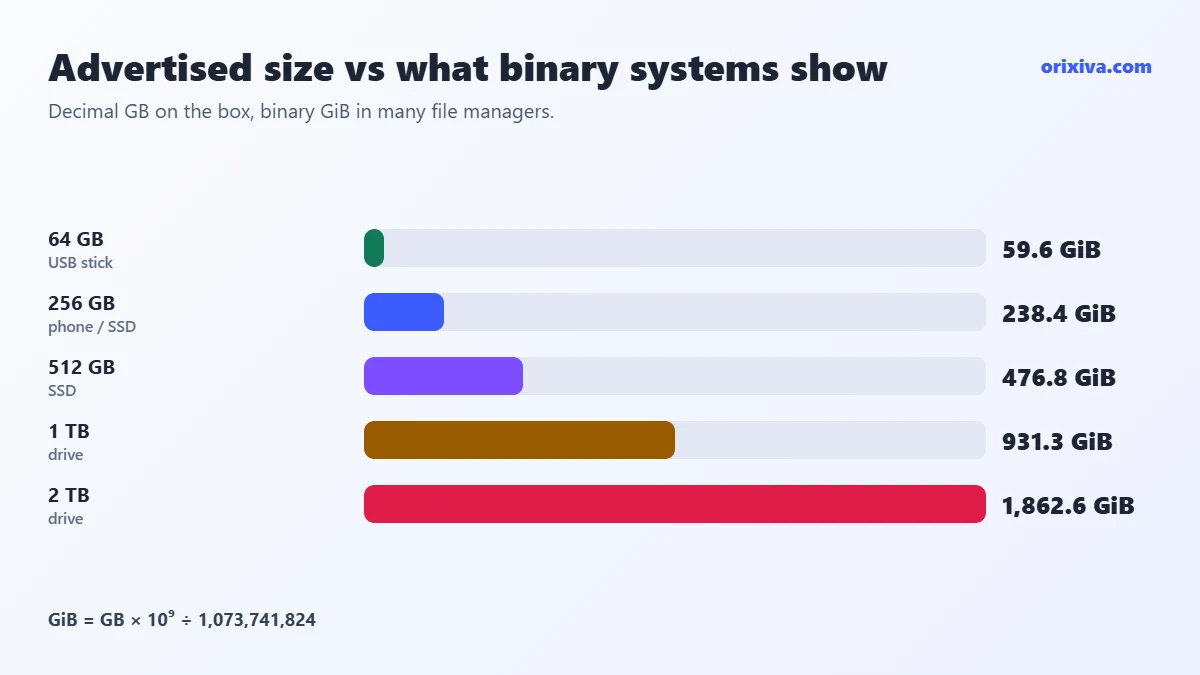
The effect is not only on big drives. A 64 GB USB stick holds 64 × 10⁹ bytes, which Windows shows as about 59.6 GB. A 32 GB memory card shows about 29.8 GB. In every case, divide the advertised GB by 1.0737 to see roughly what a binary-counting system will display.
Flowchart: which unit is my device using?
- You see a storage numberOn a box, in settings or in a file manager
- Does it say KiB, MiB, GiB or TiB?YesBinary: powers of 1,024No, says GBCheck where it comes from
- Is it a drive box, phone spec or cloud plan?YesDecimal: 1 GB = 10⁹ bytesWindows ExplorerUsually binary shown as “GB”
- Is it RAM (memory)?Memory sizes are binary: “16 GB RAM” is 16 GiB
- Convert with the storage calculatorPick GB or GiB explicitly to compare like with like
How much fits on a drive or phone?
Divide the capacity by the typical file size, using the same unit for both. Real sizes vary with camera, quality and format, so treat these as rough planning numbers:
| File type | Typical size | On 128 GB (approx.) |
|---|---|---|
| Phone photo (JPEG) | about 3–5 MB | 25,000–40,000 photos |
| Song (MP3, 4 min) | about 4 MB | about 32,000 songs |
| 1080p video, 1 hour (5 Mbps stream) | about 2.25 GB | about 57 hours |
| 4K movie download | about 15–25 GB | 5–8 movies |
Leave 10–20% free space; operating systems and apps need room to work.
Example: phone storageA “128 GB” phone has 128 × 10⁹ bytes = 119.2 GiB. After the operating system and apps take their share, you may have around 100 GB for photos. At about 4 MB per photo that is roughly 25,000 photos. Compressing images helps: see how to compress an image to 20KB, 50KB or 100KB.
Mbps vs MB/s: how long will a download take?
MB/s = Mbps ÷ 8 · time (s) = file size (MB) × 8 ÷ speed (Mbps)
Internet plans are sold in megabits per second; download windows show megabytes per second. A 100 Mbps connection moves at most 12.5 MB/s.
- 5 GB game at 100 Mbps: 5,000 MB × 8 ÷ 100 = 400 s, about 6.7 minutes in ideal conditions.
- 1 GB file at 50 Mbps: 1,000 × 8 ÷ 50 = 160 s.
- 20 GB 4K movie at 300 Mbps: 20,000 × 8 ÷ 300 = 533 s, about 9 minutes.
Real downloads are slower because of network overhead, Wi-Fi quality and server limits. For these rates, use the data transfer rate converter in the same tool, which converts Mbps, MB/s, Gbps and MiB/s.
Plan backups and video storage
How much storage do photos need per year?
Multiply what you add each day by the file size and 365. If you take 50 photos a day at about 4 MB each: 50 × 4 × 365 = 73,000 MB, which is 73 GB a year. A 1TB backup drive covers more than ten years of that, with room to spare.
Video size from bitrate
file size (GB) = bitrate (Mbps) × seconds ÷ 8 ÷ 1,000
- 10 minutes of 4K at 25 Mbps: 25 × 600 ÷ 8 ÷ 1,000 = 1.875 GB.
- 1 hour of 1080p at 8 Mbps: 8 × 3,600 ÷ 8 ÷ 1,000 = 3.6 GB.
Storage vs memory
Storage (SSD, hard drive, SD card) keeps files when the power is off and is usually sold in decimal GB and TB. Memory (RAM) holds what is running right now and is built in binary sizes. Both use the word “GB”, but a 16 GB memory stick and 16 GB of RAM are not the same number of bytes.
The 3-2-1 backup habitA common rule is three copies of important files, on two kinds of storage, with one copy off-site or in the cloud. Size each copy with the storage calculator, using the same unit for every device.
How to choose the right drive size
- List what you will store. For example 120 GB of photos, 200 GB of video and 80 GB of documents and apps: 400 GB in total.
- Add room to grow and work. Add at least 20%: 400 × 1.2 = 480 GB.
- Pick the next size up. 512 GB would be tight within a year or two; 1 TB leaves space for growth.
- Check the real figure. A 1 TB drive shows 931 GiB in Windows, still well above the 480 GB (447 GiB) you need.
All 15 storage units in bytes
| Decimal unit | Bytes | Binary unit | Bytes |
|---|---|---|---|
| Kilobyte (kB) | 1,000 | Kibibyte (KiB) | 1,024 |
| Megabyte (MB) | 10⁶ | Mebibyte (MiB) | 1,048,576 |
| Gigabyte (GB) | 10⁹ | Gibibyte (GiB) | 1,073,741,824 |
| Terabyte (TB) | 10¹² | Tebibyte (TiB) | about 1.0995 × 10¹² |
| Petabyte (PB) | 10¹⁵ | Pebibyte (PiB) | about 1.1259 × 10¹⁵ |
The converter also includes the bit, byte, kilobit, megabit and gigabit, so you can move between network and file units in one step. Upload speeds are often much lower than download speeds on home plans, so check both when you estimate how long a backup to the cloud will take.
GB to GiB conversion chart
| Advertised | Bytes | Shown in binary |
|---|---|---|
| 64 GB | 64 × 10⁹ | 59.60 GiB |
| 128 GB | 128 × 10⁹ | 119.21 GiB |
| 256 GB | 256 × 10⁹ | 238.42 GiB |
| 500 GB | 500 × 10⁹ | 465.66 GiB |
| 512 GB | 512 × 10⁹ | 476.84 GiB |
| 1 TB | 10¹² | 931.32 GiB |
| 2 TB | 2 × 10¹² | 1,862.65 GiB (1.82 TiB) |
| 4 TB | 4 × 10¹² | 3,725.29 GiB (3.64 TiB) |
How to convert storage units in Excel or Google Sheets
The CONVERT function supports bits and bytes with decimal and binary prefixes. According to Microsoft’s CONVERT reference, binary prefixes such as “Gi” and “Ti” can be used with “byte”.
| Conversion | Formula |
|---|---|
| GB to GiB | =CONVERT(A2,"Gbyte","Gibyte") |
| TB to GiB | =CONVERT(A2,"Tbyte","Gibyte") |
| Bytes to bits | =A2*8 |
| GB to GiB without CONVERT | =A2*10^9/2^30 |
Google Sheets accepts most of the same codes; the plain formula in the last row works everywhere.
How to use the free digital storage calculator (step by step)
- Open the storage converter. Go to the Orixiva digital storage converter. It opens on 500 GB to GiB as an example.
- Type your size. Enter a number such as 1, 256 or 1.5, or a calculation such as
32000*4(photos × MB each). - Choose From and To units. Bit, byte, kilobit, megabit, gigabit, kilobyte, megabyte, gigabyte, terabyte, petabyte, kibibyte, mebibyte, gibibyte, tebibyte or pebibyte.
- Read the result. For 1 TB to GiB you get 931.32 GiB, with both rates and the full-precision value.
- Check the working. “How it was calculated” converts your value into bits first, then into the target unit, so the 1,000 vs 1,024 difference is visible.
- Compare every unit. The table shows the same size in all 15 units: decimal, binary, bits and bytes.
- Save or share. Swap units, copy, download TXT or print. Press Convert to save to Recent conversions and export as CSV.
Everything runs locally in your browser: free, no login, nothing uploaded.
Mistakes to avoid with storage units
Mixing bits and bytes
Mbps and MB/s differ by a factor of 8. A “1 Gbps” connection downloads at up to 125 MB/s, not 1,000 MB/s.
Comparing GB with GiB
Convert both numbers to the same unit before deciding a drive is “short”. A 7.4% gap at the giga level is normal.
Filling a drive to 100%
Drives slow down and systems misbehave when almost full. Plan with 10–20% headroom.
Forgetting compression
A folder of 10 GB of documents may zip down to much less, while photos and videos, which are already compressed, barely shrink. Estimate storage from the original sizes for media, and do not count on zipping to make big space savings.
Assuming cloud “GB” is the same everywhere
Most cloud plans use decimal GB, but check the provider’s definition if the limit matters for backups.
Your turn: What does your 1TB or 128GB device actually show? Share the number and your operating system in the comments to help other readers.
Use the free digital storage calculator now
Convert GB to GiB, MB to KB, bits to bytes and every unit up to petabytes, with the working shown. Free online, without login, and nothing leaves your browser.
Open the free storage converter → Looking for another converter or calculator? Search on orixiva.comRelated guides: subnetting made simple, the computer and digital calculators, speed calculator online and how to convert units.
Digital storage questions people often ask
Why does my 1TB hard drive show only 931GB?
The maker counts 1 TB as 10¹² bytes. Windows counts in binary (1 GiB = 1,073,741,824 bytes) but labels it GB. 10¹² ÷ 1,073,741,824 = 931.32, so nothing is missing.
What is the difference between GB and GiB?
1 GB is 1,000,000,000 bytes. 1 GiB is 1,073,741,824 bytes, about 7.4% more.
How many MB are in a GB?
1,000 MB in a decimal GB, or 1,024 MiB in a GiB.
How do I convert Mbps to MB/s?
Divide by 8. 100 Mbps is 12.5 MB/s at most.
Is the digital storage calculator online free without login?
Yes. It is free, needs no login, and runs entirely in your browser.
Is 16 GB of RAM really 16 GB?
Memory is built in binary sizes, so “16 GB RAM” is 16 GiB, which is 17.18 billion bytes.
How many GB are in 1 TB?
1,000 GB in decimal units. In binary units, 1 TB is 931.32 GiB.
Why is my phone storage smaller than advertised?
The phone counts in decimal like the box, but the operating system and built-in apps take part of the space before you add anything.
What is the difference between Mb and MB?
Mb is a megabit; MB is a megabyte. 1 MB = 8 Mb. Internet speeds are usually in Mbps; file sizes are in MB.
Is a kilobyte 1,000 or 1,024 bytes?
Officially 1,000 bytes. 1,024 bytes is a kibibyte (KiB), though older software often still calls it a kilobyte.
How many GiB is 256 GB?
256 × 10⁹ ÷ 1,073,741,824 = 238.42 GiB.
What is a gibibyte used for?
GiB is used for memory sizes, virtual machine disks and many technical tools, where exact powers of two matter.
What comes after a terabyte?
A petabyte (PB), which is 1,000 TB. In binary units, a pebibyte (PiB) is 1,024 TiB.
How long does it take to upload 100 GB?
At 20 Mbps upload: 100,000 MB × 8 ÷ 20 = 40,000 s, about 11 hours in ideal conditions. Faster upload speeds shorten this in proportion.
How many photos fit in 1 TB?
At about 4 MB per photo, roughly 250,000, before leaving free space for the system.
How many bits are in a byte?
8 bits. A kilobit is 1,000 bits and a kilobyte is 1,000 bytes (8,000 bits).